https://www.printfriendly.com/ to by pass paywalls
Thursday, June 19, 2025

Sunday, May 18, 2025
Monday, April 14, 2025
🎬 Bring Your Ideas to Life with Jitter – The Motion Design Tool You’ll Love!
If you're someone who loves creating slick motion graphics or just needs to whip up quick, professional-looking animations for presentations, social posts, or product demos—Jitter is a game-changer.
I recently explored Jitter, and I must say—it’s like Figma and After Effects had a baby. The UI is super intuitive, and you don’t need to be a motion design expert to make things move beautifully. Whether you're designing animated text, UI mockups, or explainer clips, Jitter makes it fun and fast.
Perfect for designers, product teams, marketers—or anyone who needs to tell a story with movement. Give it a try, and you might just wonder how you ever worked without it!
👉 Explore it here: https://jitter.video/
Thursday, November 21, 2024
Thursday, September 26, 2024
Tuesday, September 3, 2024
Bruno - Opensource IDE for exploring and testing APIs.
Bruno - Opensource IDE for exploring and testing APIs Alternate to Postman
https://www.usebruno.com/
Monday, November 21, 2022
If you want to know the execution time of a piece of code? Probably you have done something like this


We can also check the excecution time of multiple process...
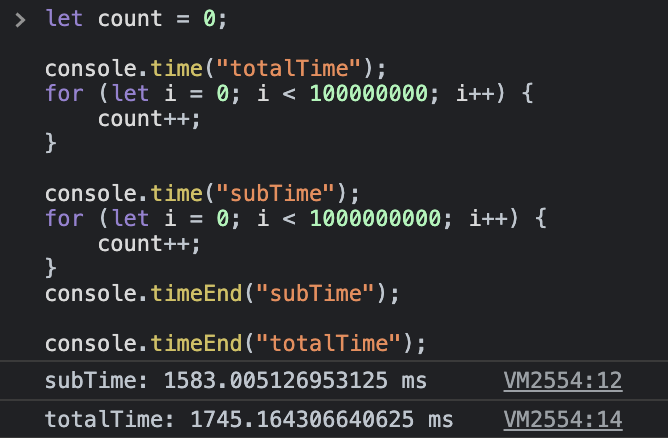
https://medium.com/@naubit/its-2022-don-t-use-console-log-anymore-but-this-e7fe4369dffe
Thursday, July 15, 2021
Azure Devops for React Native Apps
Check these links to Implemen Azure Devops for React Native Apps.
https://github.com/staff0rd/react-native-pipeline/blob/master/azure-pipelines-ios.yml
https://blog.logrocket.com/continuous-deployment-of-react-native-app-with-azure-devops/
To increase the build versions use this task
https://marketplace.visualstudio.com/items?itemName=vs-publisher-473885.motz-mobile-buildtasks
Friday, March 16, 2018
Download Apk
Below are the websites we can use to download apk from websites directly.
This is usefull when the application is not available in your country.
https://androidappsapk.co
https://apkpure.com
https://apps.evozi.com/apk-downloader/
This is usefull when the application is not available in your country.
https://androidappsapk.co
https://apkpure.com
https://apps.evozi.com/apk-downloader/
Tuesday, August 29, 2017
Find Mobile SDK's used in the Application
Check this website to see what sdk's are used in the mobile application.
https://www.appsight.io/
https://www.appsight.io/
Tuesday, July 19, 2016
Unable to Phone Call from App - href=“tel:123” in IOS Ionic and Phonegap
Just add below in config.xml file.
Thursday, July 7, 2016
Could not create the Java Virtual Machine - Ionic
Getting error when trying to run app on android device using ionic run android.
"could not create the java virtual machine".
Solution :
Create gradle.properties file in this location C:\Users\username\.gradle
and add a line org.gradle.jvmargs=-Xmx1024m -XX:MaxPermSize=256m in the file.
Now try again.It should work.
"could not create the java virtual machine".
Solution :
Create gradle.properties file in this location C:\Users\username\.gradle
and add a line org.gradle.jvmargs=-Xmx1024m -XX:MaxPermSize=256m in the file.
Now try again.It should work.
Monday, May 23, 2016
Visual Studio 2015 Cordova Project Debug issue
Unable to dubug the cordova project in Visual studio 2015.
To resolve follow below steps
To resolve follow below steps
- Close all VS instances
- cd %appdata%\Local\Microsoft\Phone Tools” (C:\Users\{UserName}\appdata\Local\Microsoft\Phone Tools )
- rename CoreCon folder
- Launch VS again.
Friday, May 9, 2014
How to "Project My Screen" in Windows Phone 8.1 to a Windows PC
Below is the link to troubleshoot the Project My screen in windows Phone 8.1
http://www.eightforums.com/tutorials/45102-windows-phone-8-1-project-my-screen-pc.html
If you have not already, you will need to download and install the Project My Screen App(ProjectMyScreenApp.msi) from the Microsoft Download Center below on your Windows 7, Windows 8, or Windows 8.1 PC.

2. On your PC, run the Project My Screen App. It will run in full screen mode by default, but you can press the F or Alt+Enter keys to toggle between full screen and windowed mode.
3. Connect your Windows Phone 8.1 to the PC using a USB cable. For example, your phone's included USB charging cable.
NOTE: If this is the first time you connected your phone to the PC, then Windows will automatically install drivers for the phone.
4. When prompted for permission on your phone, tap on yes. (see screenshot below)

5. Your phone's screen should now be projecting on the PC in the Project My Screen App. (see screenshot below)

 Tip
Tip
 Note
Note
6. When finished, you can just unplug your phone, and close the Project my Screen app (ALT+F4 or ESC + close (X)) if you like.
http://www.eightforums.com/tutorials/45102-windows-phone-8-1-project-my-screen-pc.html
If you have not already, you will need to download and install the Project My Screen App(ProjectMyScreenApp.msi) from the Microsoft Download Center below on your Windows 7, Windows 8, or Windows 8.1 PC.
2. On your PC, run the Project My Screen App. It will run in full screen mode by default, but you can press the F or Alt+Enter keys to toggle between full screen and windowed mode.
3. Connect your Windows Phone 8.1 to the PC using a USB cable. For example, your phone's included USB charging cable.
NOTE: If this is the first time you connected your phone to the PC, then Windows will automatically install drivers for the phone.
4. When prompted for permission on your phone, tap on yes. (see screenshot below)

5. Your phone's screen should now be projecting on the PC in the Project My Screen App. (see screenshot below)
 Tip
Tip
If you like, you may also wish to turn on or off showing the touch dot, and change the color of the touch dot.
How to Turn On or Off Project My Screen Touch Dot in Windows Phone 8.1
How to Turn On or Off Project My Screen Touch Dot in Windows Phone 8.1
Note
If phone screen is not projecting on PC:
If you don’t get a prompt on your phone (step 4), and the Project My Screen App remains blank (step 5), then you may have old phone drivers still installed on the PC that need to be uninstalled first.

If you don’t get a prompt on your phone (step 4), and the Project My Screen App remains blank (step 5), then you may have old phone drivers still installed on the PC that need to be uninstalled first.
- Open the WIN+X menu, and click/tap on Device Manager.
- Right click on each device (one at a time) for your phone like below, and click/tap onUninstall.
- In the Confirm Device Uninstall dialog, check the Delete the driver software for this device box if available, and click/tap on OK.
- When finished uninstalling all devices and drivers for your phone, unplug your phone, and repeat step 3 above.
6. When finished, you can just unplug your phone, and close the Project my Screen app (ALT+F4 or ESC + close (X)) if you like.
Wednesday, October 23, 2013
Titanium Invalid --ios-version value '5.0'
This can happen if you have either installed two different versions of Xcode in different locations in the past or chosen to install Xcode in a location that is different from the standard location.
First check the path where its pointing by below command
xcode-select -print-path
if this command gives any error like the below one then you need to set the path.
xcode-select: Error: Selected Xcode path (Xcode.app/Contents/Developer) is not a valid directory. Run xcode-select -switch to set the path to the Xcode folder.
To set the xcode path for titanium.
sudo xcode-select -switch /Applications/Xcode.app/Contents/Developer/
Now Restart the Titanium
First check the path where its pointing by below command
xcode-select -print-path
if this command gives any error like the below one then you need to set the path.
xcode-select: Error: Selected Xcode path (Xcode.app/Contents/Developer) is not a valid directory. Run xcode-select -switch
To set the xcode path for titanium.
sudo xcode-select -switch /Applications/Xcode.app/Contents/Developer/
Now Restart the Titanium
Tuesday, October 30, 2012
Friday, May 18, 2012
Enabling Crossbrowser calls in Chrome
If you want your HTML file from the local file system, and that file will be able to make requests to other sites to access data or other resources in chrome browser,then run below command in terminal window.
open -a /Applications/Google\ Chrome.app --args --allow-file-access-from-files --disable-web-security
Note : Before running above command close the chrome.
Thursday, April 26, 2012
Custom font in IPhone Application
Sometimes we have apply our own custom fonts in application.
But this doesn't works if font name is different from font file name.
To get the font name use below code.
Now your custom font works :).
Normally we add the fontfile name with extension to resources and a entry in plist.
In code we will use the font some thing like this
[lblTest setFont: [UIFont fontWithName: @"fontfilenamewithoutextension" size:30]];
But this doesn't works if font name is different from font file name.
To get the font name use below code.
NSArray *familyNames = [UIFont familyNames];
for( NSString *familyName in familyNames ){
printf( "Family: %s \n", [familyName UTF8String] );
NSArray *fontNames = [UIFont fontNamesForFamilyName:familyName];
for( NSString *fontName in fontNames ){
printf( "\tFont: %s \n", [fontName UTF8String] );
}
}
Pick the font name from the list which is printed in the log and then just replace that
[lblTest setFont: [UIFont fontWithName: @"fontname" size:30]];
Now your custom font works :).
Thursday, April 19, 2012
Disabling native iOS vertical window movement in phonegapp application
When we are developing phonegap application page moves up and down when we scroll in the webview eventhough page has little data.
- (void)webViewDidFinishLoad:(UIWebView *)theWebView
{
for(id subview in theWebView.subviews) {
if([[subview class]isSubclassOfClass:[UIScrollView class]])
((UIScrollView *)subview).bounces = NO;
}
Just add above extra code in appdelegates.m file webviewdidfinish load function.
This will fix the issue.
- (void)webViewDidFinishLoad:(UIWebView *)theWebView
{
for(id subview in theWebView.subviews) {
if([[subview class]isSubclassOfClass:[UIScrollView class]])
((UIScrollView *)subview).bounces = NO;
}
Just add above extra code in appdelegates.m file webviewdidfinish load function.
This will fix the issue.
Subscribe to:
Posts (Atom)